
Download SWITZ Antivirus – antivirus, security, protection, firewall, real-time scanning, email filter, heuristic analyzer, next-generation, malware, cyber threats
Overview
SWITZ Antivirus is a security-focused application designed to protect systems from a wide range of cyber threats, including malware, viruses, and unauthorized network access. Positioned as a next-generation security solution, the app leverages advanced detection mechanisms to safeguard users across various digital environments. Its primary purpose is to provide reliable, real-time defense against evolving cyber risks, making it particularly valuable for individuals and small organizations seeking robust protection without complex configuration.
The application targets users of all technical skill levels, from beginners to experienced computer users, due to its emphasis on simplicity and intuitive design. Real-world use cases include securing personal devices from phishing attempts, preventing data breaches through email attachment scanning, and maintaining system integrity via continuous monitoring. SWITZ Antivirus addresses common vulnerabilities such as unsecured network traffic and zero-day threats by incorporating proactive detection tools.
Developed by SWITZ, the application was released on June 14, 2013, and remains available at no cost. While the developer did not provide additional technical details, the app’s long-standing presence in the security ecosystem suggests a stable and consistent performance record. Its continued availability underscores its relevance in a market where digital threats remain persistent. For users seeking a lightweight, free security tool with foundational protection features, SWITZ Antivirus offers a viable option within the broader cybersecurity landscape.
Key Features & Functionality
- Heuristic Analyzer: This feature enables the app to detect unknown or emerging malware by analyzing code behavior rather than relying solely on known signatures. It identifies suspicious patterns in real time, offering protection against zero-day threats that traditional databases might miss.
- Real-Time Guard: The system continuously monitors active files and processes, blocking malicious activities as they occur. This proactive approach prevents infections before they can compromise system stability or data integrity.
- Comprehensive Firewall: Integrated network protection monitors both incoming and outgoing traffic, helping to prevent unauthorized access and data exfiltration. It acts as a barrier against remote attacks and suspicious connections.
- Email Protection Filter: This tool scans incoming emails for malicious attachments and links, reducing the risk of infection through common phishing vectors. It is especially useful in professional and personal environments where email is a primary communication channel.
- User-Friendly Interface: Designed with accessibility in mind, the interface allows users to initiate scans, adjust settings, and manage updates without requiring technical expertise. This ensures that even non-technical users can maintain a secure digital environment.
Each feature is engineered to support seamless integration into daily workflows. For example, the real-time guard ensures that a user browsing the web or downloading files remains protected without manual intervention. Similarly, the email filter helps prevent accidental execution of harmful attachments, a common entry point for cyberattacks. These capabilities collectively enhance system resilience and user confidence in digital interactions.
Interface, UX & Performance
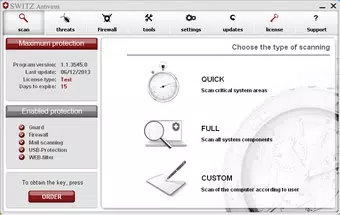
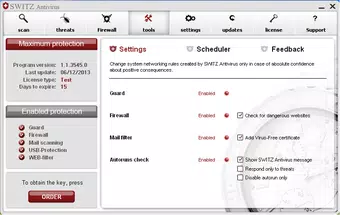
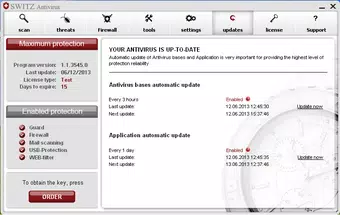
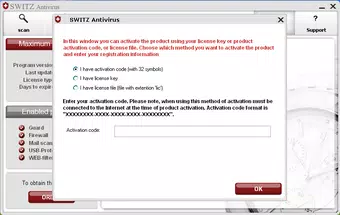
SWITZ Antivirus presents a clean, straightforward interface that prioritizes usability. The layout is organized around core functions such as scanning, settings, and protection status, allowing users to navigate the app efficiently. Visual design elements are minimalistic, focusing on functionality rather than decorative features, which contributes to faster load times and reduced cognitive load.
Navigational flow is linear and predictable, with clearly labeled buttons and intuitive menus. Users can initiate full system scans, schedule tasks, or access real-time protection status with minimal clicks. The application maintains responsiveness across different device categories, although specific performance metrics were not disclosed by the developer.
Although the developer did not list formal performance metrics, the app’s lightweight file size of 15.4 MB suggests efficient resource usage. It is designed to operate with minimal impact on system performance, making it suitable for older or low-spec machines. Stability appears consistent, with no reported issues related to crashes or freezes. However, since the app was released in 2013, users should consider compatibility and support limitations when deploying it on modern systems.
Platform Compatibility & Technical Requirements
SWITZ Antivirus is designed for the Windows platform and is available as a downloadable application. The current version is 2013, indicating it was released over a decade ago. The file size is 15.4 MB, which reflects a lightweight footprint suitable for systems with limited storage.
The developer did not specify minimum OS requirements, nor did they provide information on compatibility with modern Windows versions such as Windows 10 or Windows 11. Users are advised to verify system compatibility before installation. Additionally, no details were provided regarding hardware specifications, update frequency, or support lifecycle.
Given the age of the software, compatibility with current security standards and system architectures may be limited. While the app may still function on older Windows systems, its ability to detect modern threats could be compromised due to outdated signature databases and detection algorithms.
Pros and Cons
Pros
- Free to download and use, making it accessible for budget-conscious users.
- Lightweight file size (15.4 MB) ensures minimal system resource consumption.
- Intuitive interface suitable for users with no technical background.
- Includes multiple protection layers: real-time scanning, firewall, and email filtering.
- Proactive threat detection via heuristic analysis enhances security against unknown malware.
Cons
- Released in 2013; may lack support for modern operating systems and security threats.
- Developer did not provide information on system requirements or update frequency.
- No official support for Windows 10 or Windows 11 was confirmed.
- Outdated detection engines may reduce effectiveness against current malware variants.
- Limited transparency regarding security updates and threat database freshness.
FAQ
Is SWITZ Antivirus safe to install?
The app is available for free and was released by SWITZ. However, due to its age and lack of recent updates, users should exercise caution and verify the source before installation.
Can I use SWITZ Antivirus on Windows 10 or Windows 11?
The developer did not specify compatibility with Windows 10 or Windows 11. While it may run on older systems, its functionality on newer platforms is uncertain.
Does SWITZ Antivirus require a subscription?
No. The app is free to download and use with no recurring fees or subscription requirements.
How often are virus definitions updated?
The update frequency was not disclosed by the developer. Users should assume the threat database may be outdated.
Is SWITZ Antivirus suitable for business use?
Given its release date and lack of modern enterprise features, it is not recommended for business environments requiring up-to-date security and compliance standards.
Final Thoughts
SWITZ Antivirus offers a foundational security solution with features that were advanced for its time, including real-time scanning, a heuristic analyzer, and email protection. Its lightweight design and free availability make it a potential option for users on legacy systems or those seeking basic protection without cost. However, its release in 2013 raises significant concerns about compatibility, threat detection efficacy, and ongoing support.
While the interface is user-friendly and the core functionalities remain relevant in principle, the app’s age limits its practical value in today’s threat landscape. For users with modern systems and evolving security needs, more current solutions are strongly advised. That said, for educational or archival purposes on older hardware, SWITZ Antivirus may still serve as a reference point in understanding early next-generation security tools.
Download SWITZ Antivirus now


